
As a Chocolatier, it would be safe to say that creating professional custom chocolate requires specific knowledge. Density, weight, texture, taste, the feel of a bite; there are many factors for consideration that can be daunting.
Another aspect is what the chocolate will actually look like. Will it be a bar? Pieces? Without a direct visual, it can often be hard to visualize it at all.
It is just easier to create a standard bar or piece
...I think

But what if designing a new bar or piece didn't require years of chocolatier or engineering expertise?
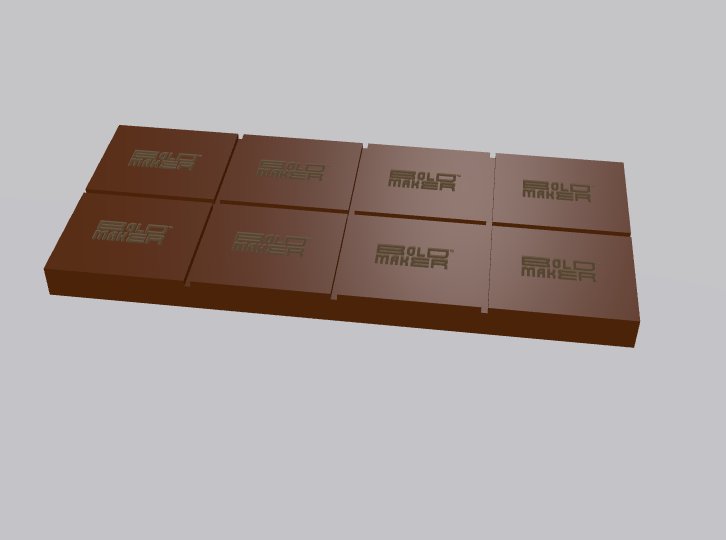
With the Bold Maker intuitive Chocolate Mold Designer, anyone can create stunning candy shapes or logo-embossed bars and pieces, with real-time 3D visualization. Whether you're launching a chocolate brand, creating custom corporate gifts, or designing specialty candies for a special occasion, you can design your chocolate to your specification, and render a mold suitable for your needs instantly.
Wow! But, how? This step-by-step guide will walk you through the entire configuration process.
The Bold Maker Chocolate Mold Designer is a web-based tool that lets you configure custom chocolate molds from scratch. Using real-time 3D rendering, you can preview exactly how your chocolate will look, before creating a mold and submitting an inquiry to us. The tool combines simplicity with professional-grade customization options, making it accessible to beginners, while offering depth for experienced candy makers.
The configurator is completely free to use, and you only commit to pricing when you request a formal quote; with responses typically arriving within one business day.


The first decision is selecting what type of chocolate product you want to create. This tool is optimized to create chocolate bars and shaped pieces. For more intricate 3D designs, we invite you to reach out to our team, who can help render and quote these projects for you:
Pieces vs. Bars

This is where the creative magic happens. You can either choose from preset shapes, or upload your own custom shape.
Shape Selection
Bold Maker offers a variety of standard shapes to get you started. Browse through the shape library and select the one that best fits your vision. Once selected, you can fine-tune every dimension.
Custom SVG Uploads
Want something truly unique? Upload a custom SVG (Scalable Vector Graphics) file. Key requirements:

Customizing Dimensions
Once you've locked in your shape, adjust the following parameters:
Piece Weight Estimation
Now this is cool. The tool automatically calculates the estimated weight of each piece, or you can input your target weight and let the auto-fit feature adjust dimensions accordingly. This is useful if you're creating chocolate pieces for a specific product specification.
Bar-Specific Options
If you chose bars, you can set:

Stand out from competitors by stamping your logo directly into the chocolate surface. You have two embossing options:
Embossed vs. Debossed
Logo Specifications
Upload your custom logo as an SVG file. To ensure the best results:
Important Preview Note: The candy preview shows your logo right-side up, but in the mold preview it appears mirrored. This is to ensure the logo is correct when making chocolate!

The final step determines how many chocolate pieces fit on a single mold.
Standard Mold Sizes
Bold Maker offers two mold sizes to choose from, a Standard 275x135x25mm template, and a Large 275x175x25mm template. Select the one that matches your production volume needs.
Calculated Layout Display
The configurator shows you exactly how many total cavities will fit a single mold with:
For example, you might see a "4 × 3 circle · solid silicone" layout, meaning 4 columns and 3 rows = 12 total cavities per mold.

Throughout the configuration process, the real-time 3D preview of your chocolate updates instantly as you make changes. You can also generate your mold at any time. You can:
the real-time 3D preview of your chocolate updates instantly as you make changes

Once you're satisfied with your design, click "Get a Quote" to move forward. You'll need to provide:
Our engineering team will review your quote request and respond within one business day with pricing, production timeline, and availability.
And there you go - you created your own chocolate!

Designing chocolate molds traditionally required:
The Bold Maker Chocolate Mold Designer compresses this timeline into minutes, giving you instant visual feedback and professional results, without leaving your desk.
Whether you're a chocolatier, small business owner, or corporate gift buyer, Bold Maker's Chocolate Mold Designer removes the friction from custom candy creation. The intuitive interface combined with professional-grade customization options means you can design exactly what you envision, then let our team refine it to perfection.
Ready to create? Head to our Chocolate Mold Designer, and start designing your perfect candy and mold today.
With over a decade of industry experience, we are leaders in mold manufacturing with a specialty in the mainstream candy, chocolate, and cannabis markets.
As proven experts, we design and engineer solutions for some of the biggest confectioners and suppliers on the planet.
If you're looking to create a product that exceeds expectations, contact us today to get started!

